क्लाउड इंश्योरेंस: Archera की व्याख्या

जब मैंने पहली बार “क्लाउड कमिटमेंट इंश्योरेंस” सुना, तो मैंने शालीनता से सिर हिलाया और मुझे बिल्कुल भी समझ नहीं आया कि वो किस बारे में बात कर रहे हैं।
इंश्योरेंस? क्लाउड कमिटमेंट के लिए? क्या इंश्योर होता है — सर्वर? डिस्काउंट? कॉन्ट्रैक्ट? और यहाँ इंश्योरेंस कंपनी कौन है?
मैंने Archera टीम के साथ कई सेशन किए इसे समझने की कोशिश में। जो बात इसे इतना confusing बनाती थी: उनका प्रोडक्ट सच में सिंपल है। इतना सिंपल कि सिंपलिसिटी ही बैरियर बन गई। कोई कॉम्प्लेक्स आर्किटेक्चर diagram करने को नहीं था, कोई 47-स्टेप इंटीग्रेशन plan करने को नहीं था। बस… काम कर गया। और मेरा दिमाग catch ढूंढता रहा।
यह पोस्ट वो गाइड है जो मैं चाहता था कोई मुझे दे देता। यह Archera को एक single extended analogy के through explain करता है जो हर concept को किसी ऐसी चीज़ से map करता है जो तुम पहले से समझते हो। फिर यह onboarding, monthly review habits, और — engineers के लिए — अपनी agentic IDE को सीधे Archera के API से कैसे connect करें, यह walk through करता है। Archera AWS, Azure, और Google Cloud सभी को support करता है, लेकिन हमारा experience AWS पर था, इसलिए article के examples AWS reflect करते हैं।
क्लाउड कमिटमेंट्स असल में कैसा महसूस होता है
Archera की बात करने से पहले, problem के बारे में बात करते हैं।
हर बड़ा cloud provider — AWS, Azure, GCP — एक ही deal ऑफर करता है: एक या तीन साल के लिए उनकी services use करने का commitment करो, और वो तुम्हें अच्छा-खासा discount देंगे। math साफ़ है। तीन साल की Reserved Instance on-demand pricing के मुकाबले 60% बचा सकती है।
लेकिन यहाँ वो catch है जो FinOps teams की नींद उड़ाता है: जब चीज़ें बदल जाएं तो क्या होगा?
तुम्हारी app किसी और region में rebuild होती है। Traffic गिरता है क्योंकि एक product line बंद हो जाती है। तुम EC2 से containers पर migrate करते हो। अचानक तुम ऐसे servers के लिए pay कर रहे हो जो कोई use नहीं कर रहा, एक ऐसे contract में फंसे हुए जिससे निकल नहीं सकते।
यह वो trade-off है जो शुरू से cloud economics को define करता आया है: savings versus flexibility। एक मिल सकती है। दोनों नहीं।
जब तक Archera नहीं आया और बोला: अगर दोनों मिल सकें तो?
DriveShield से मिलो: Archera को 5 मिनट में समझने का तरीका

मैं Archera को DriveShield नाम की एक काल्पनिक कंपनी के through explain करूंगा। हर concept सीधे Archera की किसी feature से map होता है। इस section के अंत तक, तुम पूरा product समझ जाओगे।
Setup: Car Leasing कैसे काम करता है
imagine करो कि तुम्हें अपनी बढ़ती sales team के लिए एक car चाहिए। तुम MegaMotors (इन्हें AWS समझो — हालांकि Archera सभी बड़े providers के साथ काम करता है: AWS, Azure, और Google Cloud) पर जाते हो। वो तुम्हें एक deal offer करते हैं:
| Lease Term | Monthly Payment | 3 साल में Total |
|---|---|---|
| Month-to-month rental | $800/month | $28,800 |
| 1-year lease | $600/month | $21,600 |
| 3-year lease | $450/month | $16,200 |
तीन साल की lease तुम्हें $12,600 बचाती है। लेकिन अगर तुम्हारा salesperson छह महीने में quit कर दे, तो तुम अभी भी $450 per month pay कर रहे हो एक ऐसी car के लिए जो कोई चला नहीं रहा।
सुना-सुना लगता है? यह exactly वही problem है जो companies cloud computing में face करती हैं।
DriveShield का एंट्री
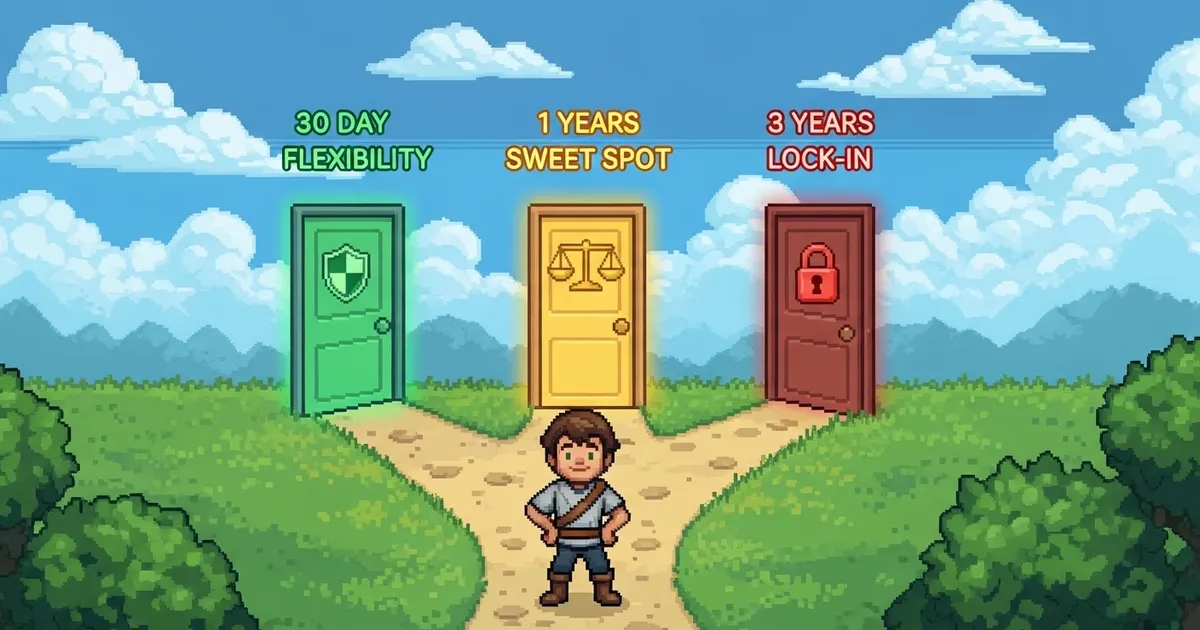
DriveShield तुम्हारे और MegaMotors के बीच आता है। Deal यह है:
- DriveShield तुम्हारी तरफ से MegaMotors के साथ तीन साल की lease sign करता है, $450/month का rate lock करते हुए
- DriveShield इसे एक guarantee में wrap करता है और कहता है: “तुम्हें यह car सिर्फ 30 दिन रखनी है — तुम्हारी choice”
- बदले में, DriveShield तुम्हारी monthly payment में एक छोटा premium add करता है
अब तुम्हारे पास तीन options हैं:
30-Day Term — Maximum Flexibility
तुम्हारा cost: $550/month ($450 base + $100 premium)। सिर्फ 30 दिन बाद, अगर car की ज़रूरत नहीं, वापस कर दो। DriveShield बाकी lease handle करेगा। साफ़-सुथरा exit।
MegaMotors से directly rent करने के मुकाबले अभी भी $250/month बचा रहे हो।
Archera equivalent: 30-day minimum term GRI (Guaranteed Reserved Instance)। तीन साल के करीब savings rates मिलती हैं लेकिन एक महीने बाद exit कर सकते हो।
1-Year Term — The Sweet Spot
तुम्हारा cost: $500/month ($450 base + $50 premium)। पहले 12 months तुम committed हो। Month 12 के बाद, guarantee kick in करती है — car कभी भी वापस करो।
Premium कम क्योंकि DriveShield कम risk ले रहा है।
Archera equivalent: 1-year minimum term GRI। बेहतर net savings क्योंकि premium कम है।
Full 3-Year Direct — Maximum Savings
तुम्हारा cost: $450/month। कोई DriveShield नहीं, कोई guarantee नहीं, कोई safety net नहीं। अगर month 8 में चीज़ें बदलें, tough luck — month 36 तक pay करो।
Archera equivalent: अपने cloud provider से सीधे खरीदी native three-year Reserved Instance या Savings Plan। Maximum discount, zero flexibility।
Side-by-Side Comparison
| 30-Day Term | 1-Year Term | 3-Year Direct | |
|---|---|---|---|
| Monthly cost | $550 | $500 | $450 |
| vs. month-to-month | $250/mo बचत | $300/mo बचत | $350/mo बचत |
| Exit कब | 30 दिन बाद | 12 months बाद | नहीं कर सकते |
| Premium | $100/mo | $50/mo | $0 |
| Change होने पर Risk | बहुत कम | मध्यम | बहुत ज़्यादा |
”Car वापस करना” का असल मतलब क्या है
यहाँ लोग confuse होते हैं। Archera दो models offer करता है, और दोनों अलग तरह से काम करते हैं:
Buyback Model: तुम DriveShield को बताते हो कि car नहीं चाहिए। वो इसे ले लेते हैं और नया driver ढूंढते हैं। तुम्हारे payments रुक जाते हैं। तुम्हें cash back नहीं मिलता — बस पैसे बहना बंद होता है।
Archera terms में: वो commitment तुम्हारे account से हटा देते हैं और बची हुई obligation खुद absorb करते हैं।
Rebate Model: Car तुम्हारे driveway में रहती है, लेकिन DriveShield तुम्हें हर month check भेजता है wasted payments cover करने के लिए। तुम financially whole हो जाते हो भले ही lease technically अभी भी exist करता है।
Archera terms में: commitment तुम्हारे cloud account में रहता है, लेकिन Archera ACH transfer via reimburse करता है।
Free Dashboard
DriveShield तुम्हें एक free platform भी देता है — insurance buy करने की ज़रूरत नहीं — जो दिखाता है:
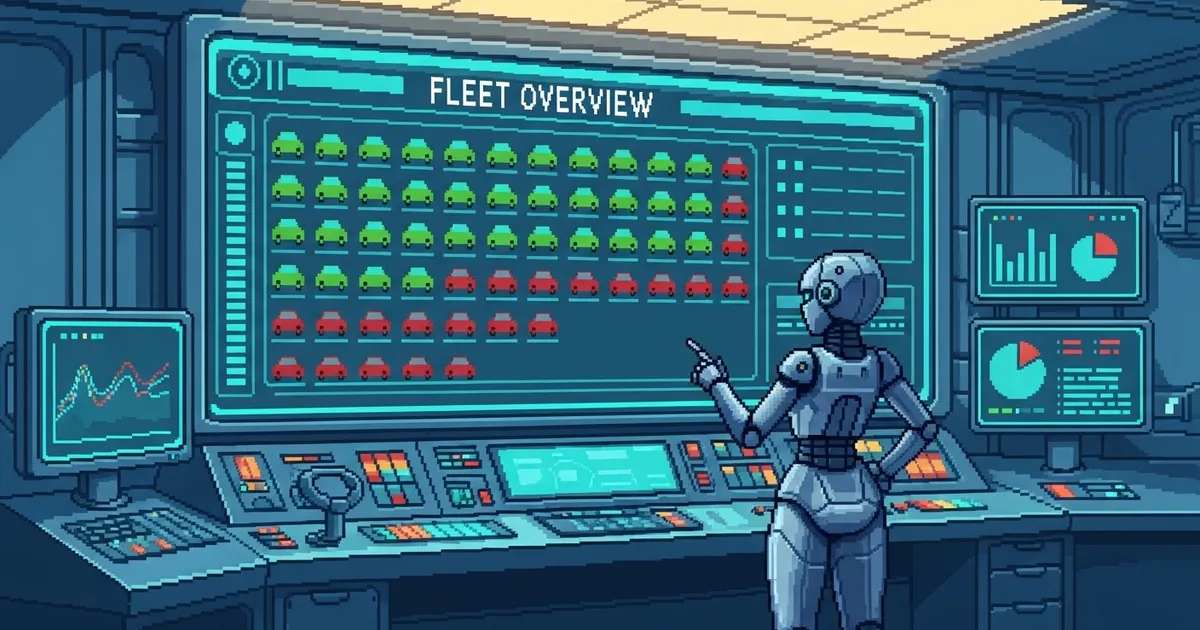
- कौन सी cars चल रही हैं vs खड़ी हैं → Cost visibility और utilization monitoring
- हर lease कब expire होती है और renewal options → Commitment inventory
- 6, 12, और 36 months में fleet needs का forecast → ML-powered forecasting
- Lease terms का optimal mix recommend करना → Commitment Planner recommendations
- Alert जब कोई car दो हफ्ते से नहीं चली → Slack/email anomaly alerts
बहुत सी companies सिर्फ dashboard use करके fortune बचाती हैं, regular MegaMotors leases के बारे में smarter decisions लेकर। Insurance buy करने की ज़रूरत ही नहीं।
असली जादू: Mix and Match
कोई सिर्फ एक option नहीं चुनता। Smart DriveShield customers यह करते हैं:
- CEO और CFO की cars के लिए 3-year direct leases (वो कहीं नहीं जा रहे)
- Established sales team के लिए 1-year DriveShield terms (stable लेकिन guaranteed नहीं)
- Probation पर new hires के लिए 30-day DriveShield terms
Archera customers exactly ऐसे ही operate करते हैं — native long-term commitments और Insured Commitments का blend, अलग-अलग minimum terms के साथ, हर workload की certainty level के हिसाब से customized।
DriveShield से आगे: Portal के हर Concept के लिए Analogies
DriveShield analogy core insurance model cover करती है। लेकिन जब तुम Archera portal में login करोगे, तो और features दिखेंगे जिन्हें अपने mental models चाहिए। हर एक के बारे में ऐसे सोचो।
Segments — तुम्हारे Fleet के Departments
जब तुम चार offices में 50 cars का fleet manage करते हो, उन्हें एक blob की तरह manage नहीं करते। Group करते हो: Sales West, Sales East, Executive, Intern Pool।
Archera Segments ऐसे ही काम करते हैं। Cloud resources को business unit, application, या team के हिसाब से group करो। अचानक तुम एक giant cloud bill नहीं देख रहे — तुम देख रहे हो कौन सा department cash burn कर रहा है और कौन सा lean चल रहा है।
Insight बदलता है “हमने पिछले month $84,000 खर्च किए” से “marketing team का dev environment production से ज़्यादा cost करता है।“
Commitment Inventory — तुम्हारा Fleet Ledger
imagine करो कि तुम्हारी company ने जो भी lease sign की, एक spreadsheet में। हर car, हर term, हर expiry date, हर monthly payment। कौन सी locked हैं। कौन सी return हो सकती हैं। कौन सी अगली quarter expire हो रही हैं।
वो Commitment Inventory है। हर Savings Plan, हर Reserved Instance, हर GRI — cost, expiry, utilization, और guarantee window open है या नहीं।
Commitment Planner — तुम्हारा Fleet Advisor
15 नई cars बिना किसी expert से पूछे नहीं खरीदोगे। Fleet advisor तुम्हारा hiring plan, travel schedules, seasonal peaks देखता है, और कहता है: “Q2 में तीन और sedans चाहिए, और दो SUVs को compacts में downgrade करो।”
Archera का Commitment Planner यह machine learning से करता है। तुम्हारे usage patterns analyze करते हैं, future needs forecast करते हैं, और commitment types और terms का optimal mix recommend करते हैं।
Automation Policies — Autopilot Fleet Management
“जब कोई car 30 दिन से नहीं चली, automatically return करो। जब new hire start करे, automatically 1-year term पर sedan lease करो।”
Automation Policies तुम्हें rules set करने देती हैं: coverage threshold से नीचे जाए तो auto-purchase, utilization गिरे तो auto-buyback guarantee invoke करो। Policy set करो, monthly review करो, चलने दो।
Forecasting — तुम्हारे Budget का Weather Forecast
Weather forecast exactly नहीं बताता क्या होगा। हर scenario की probability बताता है। Archera की Forecasting ऐसे ही काम करती है — historical patterns के basis पर cloud costs और commitment needs project करती है, probable scenarios देती है planning के लिए।
Cost Visibility — Fleet GPS Tracker
कौन सी cars रोज़ चल रही हैं? कौन सी पूरे हफ्ते parking में खड़ी रहीं? GPS tracker झूठ नहीं बोलता।
Archera का utilization monitoring exactly दिखाता है कौन से commitments अपनी कीमत वसूल कर रहे हैं और कौन से waste generate कर रहे हैं। जब utilization 80% से नीचे गिरे, तो जानो कि investigate करने का time है।
हमारा सफ़र: Skepticism से Case Study तक

ईमानदारी से बताता हूँ। जब Olaplex में हमारी team ने पहली बार Archera evaluate किया, reaction curiosity और caution का mix था। Cloud commitment insurance? एक ऐसी company से जिसका नाम कभी नहीं सुना? यह कुछ ऐसा लगा जो हम politely decline कर देंगे।
लेकिन Archera team अधिकतर vendor conversations से अलग थी। वो knowledgeable, direct, और अपने product क्या करता है और क्या नहीं करता, इसके बारे में refreshingly honest थे। हमने Aran Khanna, Archera के CEO, को भी call पर बुलाया। वो impression बना गया।
जब हम concept से comfortable हो गए और इसे on किया, experience exactly वही था जो उन्होंने promise किया था: minimal setup और almost zero long-term overhead के साथ एक turn-key solution। Integration एक CloudFormation stack था जो minutes में हो गया। Dashboard तुरंत light up हो गया।
पहली real win? हमने 1.7 terabytes unused backup storage discover किया जो एक साल से ज़्यादा समय से run हो रहा था। इसे clean करने से approximately $20,000 annually बचे। जैसा मैंने case study में कहा: “ये वो छोटी-छोटी चीज़ें हैं जो तुम discover और clean up करते हो जो efficiently run करने में help करती हैं। Platforms में ज़्यादा confidence आता है और maximum profitability पर run करते हो।”
हम 0% से 91% workload optimization coverage पर पहुँचे। Partnership ने इतना impression बनाया कि हम सभी partners के साथ joint case study करने को राज़ी हो गए।
Onboarding असल में कैसे काम करता है
जो बात हमें surprise कर गई वो थी कितना कम effort लगा। Process ऐसा दिखता है:
| Step | Time | क्या होता है |
|---|---|---|
| archera.ai पर sign up | 5 min | Account बनाओ, one-click CloudFormation से AWS connect करो |
| IAM delegation | 10 min | Read-only cross-account role (AssumeRole + External ID) |
| Free dashboard दिखता है | तुरंत | Cost visibility, utilization monitoring, forecasting — कोई payment नहीं |
| Recommended plan review | ~15 min | Archera का ML optimal commitment mix recommend करता है |
| Automation on करो (optional) | 5 min | Auto-purchase और auto-buyback policies enable करो |
| Total initial setup | ~35 min | बस इतना। सच में। |
Monthly Review Ritual
जहाँ Archera सच में dividends देता है वो है monthly review। approximately 30 minutes लगते हैं और किसी quarterly FinOps meeting से ज़्यादा strategic clarity मिलती है:
- Metrics check करो — coverage, utilization, lifetime savings, month-to-date savings
- Commitment inventory review — क्या expire हो रहा है, क्या underutilized है, क्या locked है
- Recommended plan देखो — Archera का ML current mix को optimal से compare करता है
- Segment analysis — कौन से business units efficient हैं, किन्हें attention चाहिए
- Infrastructure planning — insights को team के साथ capacity conversations में use करो
Bulk discounts से पैसे बचाना एक बात है। पैसे इसलिए बचाना कि तुम समझते हो कि infrastructure business को कैसे support करता है — और उसे lean और mean रखते हो — बिल्कुल अलग बात है।
अपनी Agentic IDE को Archera के API से Connect करना

यहाँ से engineers के लिए interesting हो जाता है। Archera के पास एक REST API है जिसके endpoints real AWS data return करते हैं — resource ARNs, cost breakdowns, commitment details, savings metrics। ये dashboard-only data नहीं है। ये वो data है जो analysis tools, dashboards, और automation में pipe कर सकते हो।
किसी भी agentic IDE से कर सकते हो:
| IDE | Link |
|---|---|
| Antigravity | antigravity.dev |
| VS Code + ChatGPT Codex | code.visualstudio.com + chatgpt.com/codex |
| VS Code + Claude Code | code.visualstudio.com + docs.anthropic.com |
| VS Code + Cline | code.visualstudio.com + cline.bot |
| Kiro | kiro.dev |
| Cursor | cursor.com |
Prompt 1: Connect और Verify
इसे अपनी IDE के AI assistant में copy करो। Placeholder को अपनी real API key से replace करो, जो app.archera.ai/settings → API पर generate कर सकते हो।
Set up a Python project to connect to the Archera.ai API.

Base URL: https://api.archera.ai
Auth: x-api-key header (NOT Bearer token)
API docs: https://api.archera.ai/docs
OpenAPI spec: https://api.archera.ai/openapi.json

Steps:
1. Create a .env file with ARCHERA_API_KEY=<your-key-here>
2. Install requests and python-dotenv
3. Write a connection test that calls GET /v1/orgs
4. Parse the response to get org_id, org name, and your role
5. Call GET /v1/org/{org_id}/metrics?provider=aws
6. Print a clean summary: org name, coverage %, utilization %,
   lifetime savings, MTD savings, whether automation is enabled
7. Handle these errors:
   - 401: Invalid or expired API key
   - 404: Wrong endpoint path
   - 422: Missing required query params (provider=aws)
बस। approximately दो minutes में, AI assistant के पास Archera data की working connection होगी।
Prompt 2: Analysis के लिए SQLite में Load करो
Connect होने के बाद, real power Archera data को environment की दूसरी sources के साथ combine करने से आती है। यह prompt सब कुछ local SQLite database में load करता है:
Using the Archera API connection from the previous step, load data
into a local SQLite database for analysis.

Pull from these endpoints:
- GET /v1/org/{org_id}/resources?provider=aws
- GET /v1/org/{org_id}/commitments?provider=aws
  &start_date=2024-01-01&end_date=2025-12-31
- GET /v1/org/{org_id}/commitments/chart?provider=aws
  &start_date=2024-01-01&end_date=2025-12-31
- GET /v1/org/{org_id}/metrics?provider=aws

Create a SQLite database called archera_analysis.db with these tables:
- resources (from resources endpoint — include ARN, service,
  instance_type, region, sub_account_id, is_reservable, tags)
- commitments (from commitments endpoint — include type, is_leased,
  status, utilization, savings, net_savings, lease terms)
- monthly_chart (from chart endpoint — date, savings, net_savings,
  utilization, projections)
- metrics (from metrics endpoint — point-in-time snapshot)

Then run these analyses:
1. Monthly savings trend — are we saving more or less over time?
2. Commitment utilization by type (Savings Plan vs RI vs GRI)
3. Resources NOT covered by any commitment (the coverage gap)
4. What happens to projected savings if coverage increases to 95%?
5. Which AWS accounts have the lowest commitment coverage?

Generate a Markdown summary report with findings and recommendations.
यह financial operations के लिए agentic IDE use करने का एक simple लेकिन powerful example है। AI, API calls, schema creation, data loading, और analysis handle करता है। Strategic questions तुम पूछते हो।
MCP के बारे में एक Note
जब मैंने यह article पहली बार लिखा था, Archera के पास MCP server नहीं था। वो बदल रहा है — वो Claude के लिए MCP integration roll out कर रहे हैं, broader IDE support भी जल्द आने वाला है। फिलहाल, ऊपर दिए REST API prompts किसी भी agentic IDE में काम करते हैं, और हर endpoint clean JSON return करता है।
असली value connector format में नहीं है। अपने commitment data के बारे में सही questions पूछने में है — और answers को better infrastructure decisions के लिए use करने में।
बड़ी तस्वीर

एक बात है जो बार-बार दिमाग में आती है।
Archera का product सच में simple है। Cloud account connect करो — AWS, Azure, या Google Cloud। Costs देखो। Recommendations लो। Automation on करो। Monthly review करो। बस इतना।
Explain करना मुश्किल इसलिए नहीं है कि यह complex है — novelty है। Archera ने एक ऐसी product category बनाई जो पहले exist नहीं करती थी। Cloud commitment insurance। कोई पहले से मौजूद mental model नहीं। कोई “यह X जैसा है लेकिन Y के लिए” नहीं जो सब पहले से जानते हैं।
इसलिए मैंने यह post लिखा। Archera की documentation बुरी है इसलिए नहीं — नहीं है। लेकिन कभी-कभी एक new concept को एक familiar story में wrap करना पड़ता है, इससे पहले कि brain उसे अंदर आने दे।
अब जब कोई मुझसे पूछता है “Archera क्या करता है?” मेरे पास जवाब है:
“जानते हो कि non-refundable hotel booking में cancellation insurance add कर सकते हो? Archera cloud commitments के लिए वो करता है। Deep discounts, लेकिन अगर plans बदलें, तो covered हो।”
और फिर DriveShield की कहानी सुनाता हूँ।
क्या तुमने कभी एक genuinely novel product अपनी team को explain करने की कोशिश की — और उसी comprehension wall से टकराए? मुझे जानना है कौन सी analogy ने आखिरकार click किया।
Resources
- Archera.ai — Cloud Commitment Management
- Olaplex + Insight + Archera Case Study
- Archera API Documentation
- Archera OpenAPI Spec
- Antigravity IDE
- VS Code
- ChatGPT Codex
- Claude Code
- Cline
- Kiro IDE
- Cursor IDE